---
title: "Element Count Calculation"
---
> Documentation Index
> Fetch the complete documentation index at: https://wiki.wrightkit.dev/llms.txt
> Use this file to discover all available pages before exploring further.
# Element Count Calculation
## Table of Contents {#table-of-contents}
1. Overview
2. Base Element Cost
3. Adjustment Rules
4. Examples
## Overview {#overview}
Sometimes, it may be necessary for a Workshop creator to understand how element count is affected by various components within the Workshop. The total element count is the sum of the costs of each component, with several adjustment rules applied.
This wiki page is based off the work of [Zezombye](https://workshop.codes/u/Zezombye). In particular, this page is an adaptation of [this GitHub wiki page](https://github.com/Zezombye/overpy/wiki/Element-saving-techniques) by Zezombye.
## Base Element Cost {#element-count-breakdown}
The following table lists the element cost of every component in the Workshop at time of writing.
Note that some components match more than one description. For example, the [Array](/values/array/) value matches both the `Value (Default)` and `Array` description. In this case, the more specific description overrides the other descriptions, thus indicating that the Array value costs 2 elements before adjustment rules are applied.
| Description | Base Element Cost |
| -------- | :--------: |
| Rule | 1 |
| Action | 1 |
| Condition | 1 |
| Value (Default) | 1 |
| Array | 2 |
| Workshop Settings | 2 |
| Evaluate Once | 2 |
| Literal (Default) | 1 |
| Locale/Localized String | 2 |
Comments, custom game settings, Rule parameters (e.g. Event, Team, Player) do not contribute towards element count.
## Adjustment Rules {#adjustment-rules}
The following adjustment rules are applied to the base element cost of components.
- Disabling a Rule, Action, or Condition has no effect on the element count.
- For every pair of hero literals within the parameters (no matter how deeply nested) of the top-level arguments of an Action or Condition, an additional element is added.
- For example, `Action(Ana, Zenyatta)` does not cost an extra element, but `Action(Array(Ana, Zenyatta))` does cost an extra element.
- Similarly, `Action(Array(Value(Ana), 1), Array(Value(Zenyatta)))` costs an extra element.
- Every top-level argument of an Action or Condition costs one less element than it would otherwise.
## Examples {#examples}
Example 1
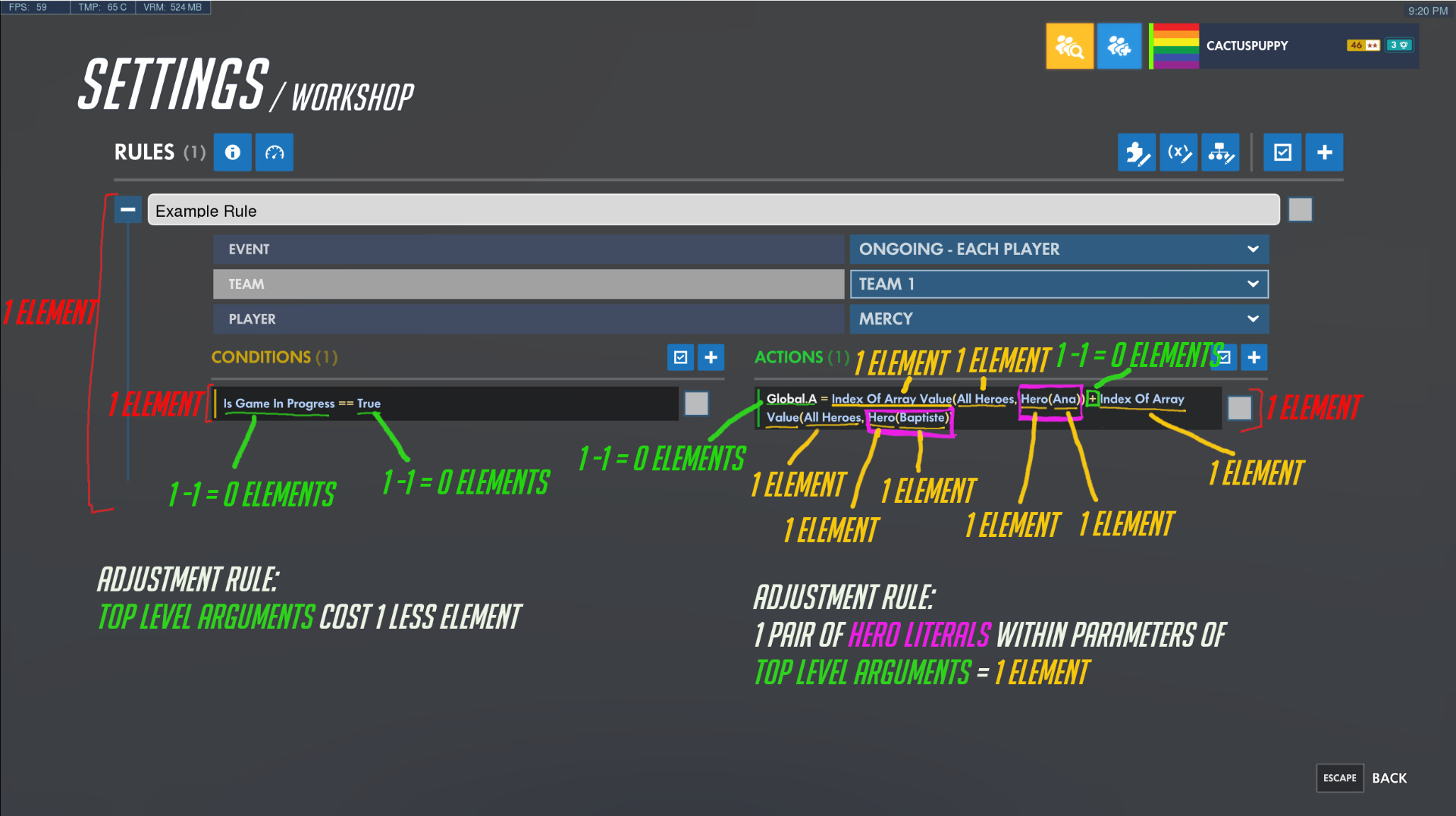
**Explanation:**
The Rule itself costs one element. There is only one Condition and only one Action, so that is one additional element each for a total of two. (Subtotal: 3)
Within the Condition, `Is Game In Progress` is a Value, which costs 1 element, but since it is a top-level argument, its cost is reduced by 1 element, for a total of 0. Similarly, the `True` Value is normally worth 1 element, but since it is a top-level argument, it contributes 0 elements to the total cost. (Subtotal: 0)
The Action contains two top-level arguments: `Global.A` and `Add`. Both are normal Values, and as such cost 1 element each, which is reduced to 0 due to the top-level reduction. Within the `Add` value, two `Index of Array Value`s add an additional 2 elements, and the two `All Heroes` add an additional 2 elements as well. The two `Hero` values add 2 elements, and the hero literals within add 2 more elements, for a total of 8 elements. However, an adjustment rule has now come into play, since the Hero literals were parameters within top-level arguments of the Action. This adjustment rule adds an additional 1 element to the cost. (Subtotal: 9)
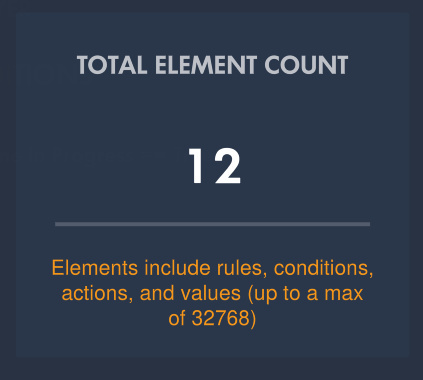
Adding up the subtotals for each section, we find the total element count to be 3 + 0 + 9 = 12.
Source: https://wiki.wrightkit.dev/references/element-count-calculation/index.mdx